How Does Technical SEO Improve Website Crawling and Indexing?
Technical SEO improves website crawling and indexing by removing structural roadblocks so search engine bots can efficiently discover, render, and store your pages. Through clean URL architecture, optimised XML sitemaps, proper robots.txt directives, fast server response times, and canonical tags, technical SEO prevents wasted crawl budget and duplicate content conflicts. When search engines and AI answer engines can access your content effortlessly, your pages qualify for higher rankings and accurate citations.
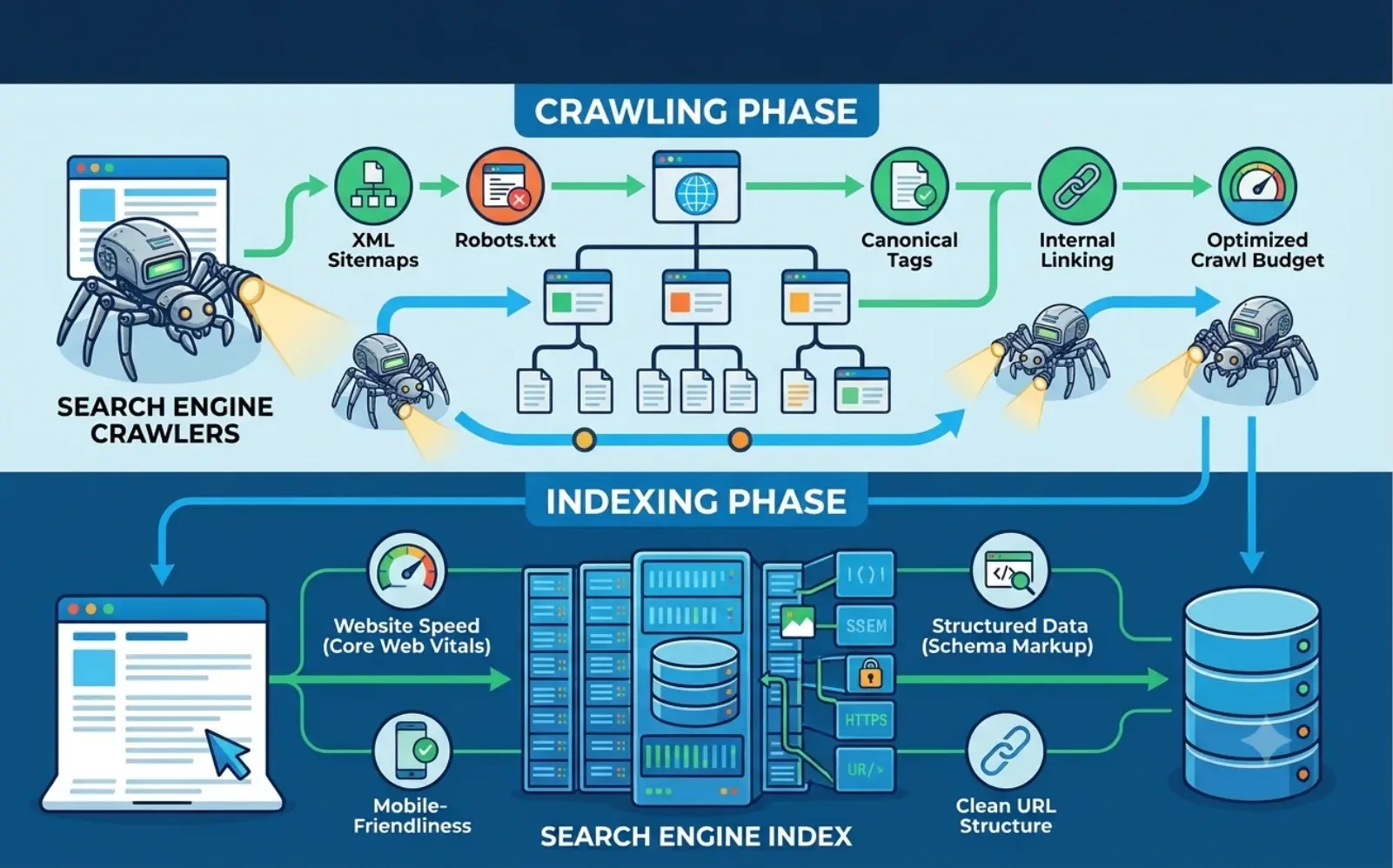
You can publish the most helpful articles and product pages in your industry, yet none of them will generate organic traffic if search engine bots cannot reach or understand them. Hidden crawl traps, broken redirects, slow JavaScript rendering, and duplicate URLs quietly keep valuable pages trapped outside Google's index.
In this guide, you will learn the exact difference between crawling and indexing, which technical SEO elements remove discovery bottlenecks, and how to audit your website for peak search visibility.
What Is the Difference Between Crawling and Indexing?
Before optimising your site infrastructure, it helps to separate the two distinct stages search engines use to process web pages.
- Crawling (Discovery): Automated bots (such as Googlebot or Bingbot) follow internal links, external backlinks, and XML sitemaps to find new or updated URLs across your website.
- Rendering (Processing): The search engine executes HTML, CSS, and JavaScript to see the page layout and content just like a human visitor.
- Indexing (Storage & Understanding): Once rendered, the search engine analyses text, headings, images, and structured data, then stores the page in its massive database to serve for relevant search queries.
If crawling fails due to a blocked file or broken link, indexing never happens. Conversely, if a bot crawls a page but encounters thin duplicate content or accidental noindex tags, the page gets dropped from search results.
Which Technical SEO Elements Directly Improve Crawlability?
Search engines allocate a finite amount of time and resources—known as crawl budget—to every domain. Partnering with experienced digital marketing and SEO specialists ensures bots spend that budget on your highest-value pages rather than low-value filter URLs.
Key technical elements that streamline bot discovery include:
- Clean XML Sitemaps: A dynamically updated XML sitemap lists only canonical, indexable 200 OK URLs, acting as a direct roadmap for search crawlers.
- Precision robots.txt Rules: Properly configured robots.txt directives block bots from wasting crawl budget on admin dashboards, internal search results, and duplicate parameter URLs without accidentally blocking vital CSS or JS files.
- Logical Internal Linking & Flat Architecture: Keeping important pages within three clicks of the homepage passes link equity smoothly and eliminates "orphan pages" that bots cannot find.
- Fast Server Response Times (TTFB): Reliable hosting and optimised backend code allow crawlers to request more pages per second without triggering server timeouts.
- Clean Redirect Chains: Replacing multi-hop 301 -> 301 -> 200 chains with single direct redirects prevents crawlers from abandoning URLs mid-path.
How Does Technical SEO Ensure Accurate Indexing?
Once a bot successfully crawls your site, indexing signals tell search engines which version of a page is authoritative and what topics it covers. Building sites with clean semantic code—a core focus of modern custom web development—makes parsing content effortless for both traditional crawlers and AI models.
| Technical SEO Factor | Crawling Impact | Indexing Impact | Best Practice |
|---|---|---|---|
| Canonical Tags (rel="canonical") | Reduces redundant crawling of URL parameters | Consolidates ranking signals onto one primary URL | Add self-referencing canonicals on every indexable page |
| Meta Robots & X-Robots Tags | Guides bots on link-following (follow / nofollow) | Controls whether a page enters the search index (index / noindex) | Remove accidental noindex tags after staging migrations |
| Structured Data (Schema Markup) | Helps bots classify page entities faster | Unlocks rich snippets and improves AI answer engine citations | Implement JSON-LD for Articles, FAQs, Products, and Services |
| JavaScript Rendering (SSR / SSG) | Prevents bots from stalling on heavy client-side scripts | Ensures core text and links appear in the initial HTML snapshot | Use Server-Side Rendering or static pre-rendering for key pages |
| Mobile-First Parity | Ensures Google's smartphone crawler sees full navigation | Indexes mobile content, headings, and structured data accurately | Keep identical content and links across mobile and desktop views |
How Do Site Speed and Core Web Vitals Affect Bot Efficiency?
Page speed is not just a user-experience metric—it directly governs how quickly search engines crawl and render your website. When a server responds slowly or heavy scripts stall browser rendering, crawlers throttle their request rate to avoid overloading your site.
Optimising performance across both desktop and mobile application ecosystems relies on several engineering improvements:
- Minimise Render-Blocking JavaScript and CSS: Defer non-critical scripts so primary text and links load immediately.
- Compress Images and Serve Next-Gen Formats: Convert bulky PNGs and JPEGs into lightweight WebP or AVIF files with descriptive alt attributes.
- Enable Browser Caching and CDN Delivery: Serve static assets from edge servers close to users and crawlers to lower Time to First Byte (TTFB).
- Eliminate Broken Links (404 & 5xx Errors): Regularly audit server logs to fix dead internal links and server errors that waste crawler requests.
According to technical documentation from Google Search Central, maintaining healthy server response times and clean internal link structures directly enables Googlebot to crawl more pages efficiently and keep search results fresh.
How Can You Run a Quick Technical SEO Crawl & Index Audit?
You do not need to guess how search engines view your website. Running a structured monthly check catches indexing issues before they cause traffic drops.
Use this five-step diagnostic checklist:
- Inspect Google Search Console Indexing Reports: Review the Page Indexing tab to identify pages marked as "Crawled - currently not indexed" or "Duplicate without user-selected canonical."
- Test Live URLs with the URL Inspection Tool: Check how Google renders your rendered HTML, confirm canonical selection, and spot blocked resources.
- Run a Full Site Crawl: Use a crawler tool to detect broken internal links, redirect loops, missing title tags, and orphan pages sitting outside your navigation.
- Validate Your XML Sitemap and robots.txt: Verify that your sitemap URL is declared inside robots.txt and contains zero 404 or noindex URLs.
- Check Schema Markup Validation: Test structured data snippets to ensure search engines and AI systems can parse your FAQs, business details, and articles cleanly.
You can explore real-world examples of high-performing digital platforms and scalable technical architectures in the Arkay Apps portfolio to see how clean engineering supports long-term organic growth.
FAQs About Technical SEO Crawling and Indexing
How long does it take for Google to crawl and index a new page?
Google can discover and index a well-linked page within a few hours to a few days, especially if it is included in your XML sitemap and submitted via Google Search Console. However, low-authority sites or pages buried deep in site architecture may take several weeks to be indexed.
What is the difference between robots.txt and a noindex tag?
A robots.txt file tells search bots which URLs or folders they are not allowed to crawl, whereas a noindex meta tag tells bots they may crawl the page but must not include it in search results. Never block a noindex page in robots.txt, or bots will never see the noindex directive.
Why does Google say "Crawled - currently not indexed"?
This status means Googlebot successfully visited the page, but its algorithms decided the content did not add enough unique value compared to existing indexed pages. Improving content depth, strengthening internal links, and consolidating thin duplicate pages usually resolves the issue.
Does technical SEO also help AI search engines like ChatGPT and Perplexity?
Yes, AI answer engines rely on web crawlers and search indexes to retrieve factual information. Clean HTML structure, clear heading hierarchies, fast load speeds, and JSON-LD schema markup make it much easier for AI systems to parse and cite your content accurately.
How often should I perform a technical SEO audit?
You should run a lightweight technical health check monthly in Google Search Console and conduct a comprehensive crawl audit every quarter—or immediately after any website redesign, CMS migration, or URL structure update.
What to Do Next to Strengthen Your Website's Crawlability
Technical SEO forms the invisible foundation that allows every piece of content on your website to rank. When you streamline your site architecture, keep your XML sitemaps spotless, eliminate duplicate URLs, and maintain fast server speeds, search engines and AI platforms can index your pages reliably.
Start by opening Google Search Console to check your current index coverage and fix any blocked or broken URLs—and if you need expert engineering or SEO support to scale your site's performance, connect with the team via the Arkay Apps contact page.